
For Liquor Retailers
Make Your Store Part Of The Hunt.
Stave helps bourbon shoppers find stores worth a stop, plan a route, understand bottles, and follow local updates. Give them a clearer reason to discover yours.
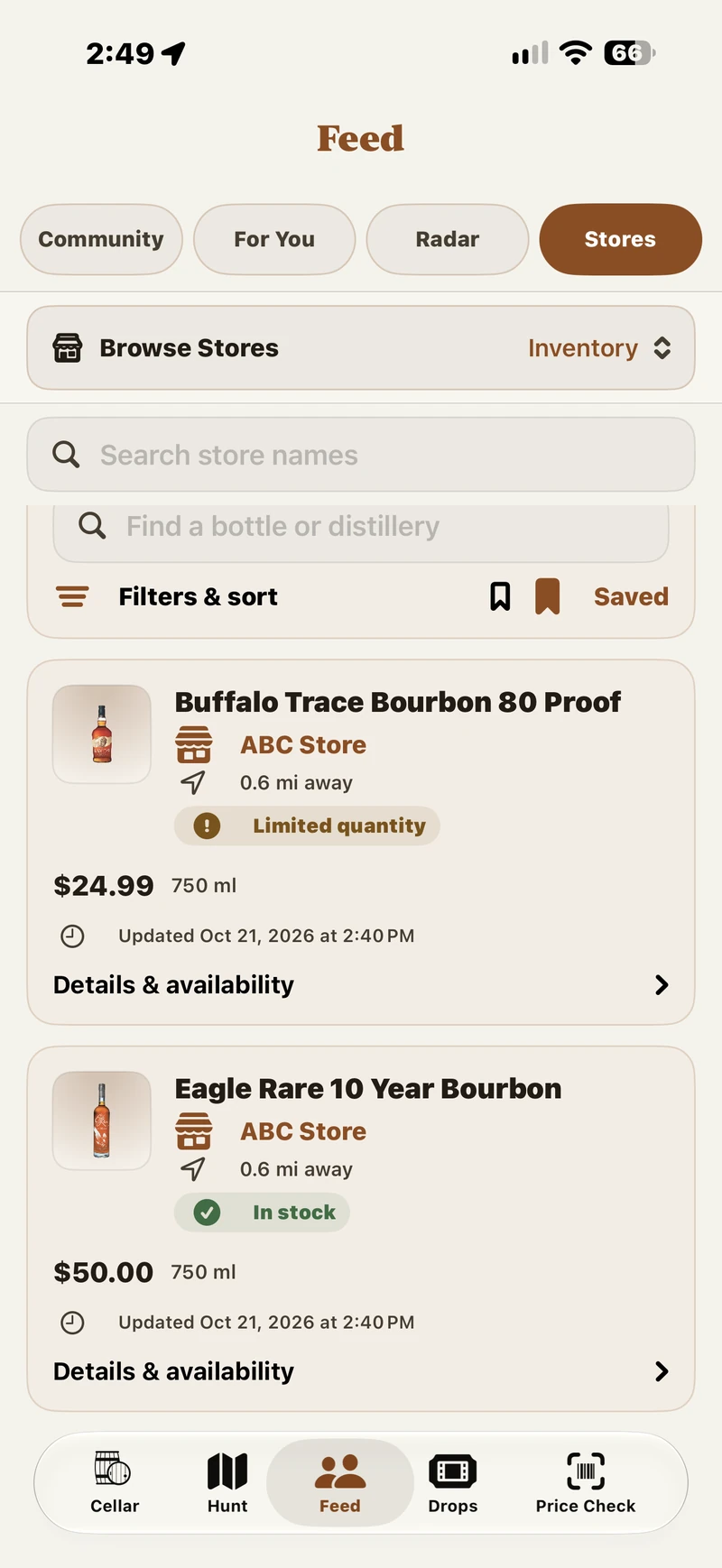
Your Store In Stave
Show What You Share.
Selected inventory appears with a price and update time, giving shoppers more context for a visit.
Real Stave app screens in a guided sequence, not a recording. Store content can change.
Why Participate
Be Part Of The Shopper's Next Stop.
People use Stave while asking where to go, what to look for, and what is happening nearby. A useful store presence helps them consider your location when they do not already know your name.
Show Up In The Hunt.
Shoppers can find stores on the Hunt map, see bourbon-specific community feedback, save a location, and include it in a planned route.
Explain What Makes A Visit Worthwhile.
Store details and the updates you publish give people more to consider than an address alone. Your selection, local products, store picks, and staff knowledge can matter without rare allocations.
Share What Comes Next.
Announcements, expected deliveries, and approved Drops give interested shoppers a way to keep up. Their follows and notification choices remain theirs.
Stave does not promise visits or sales. Community ratings come from shoppers; retailer participation does not purchase a better score.
What Shoppers See
From Discovery To A Decision.
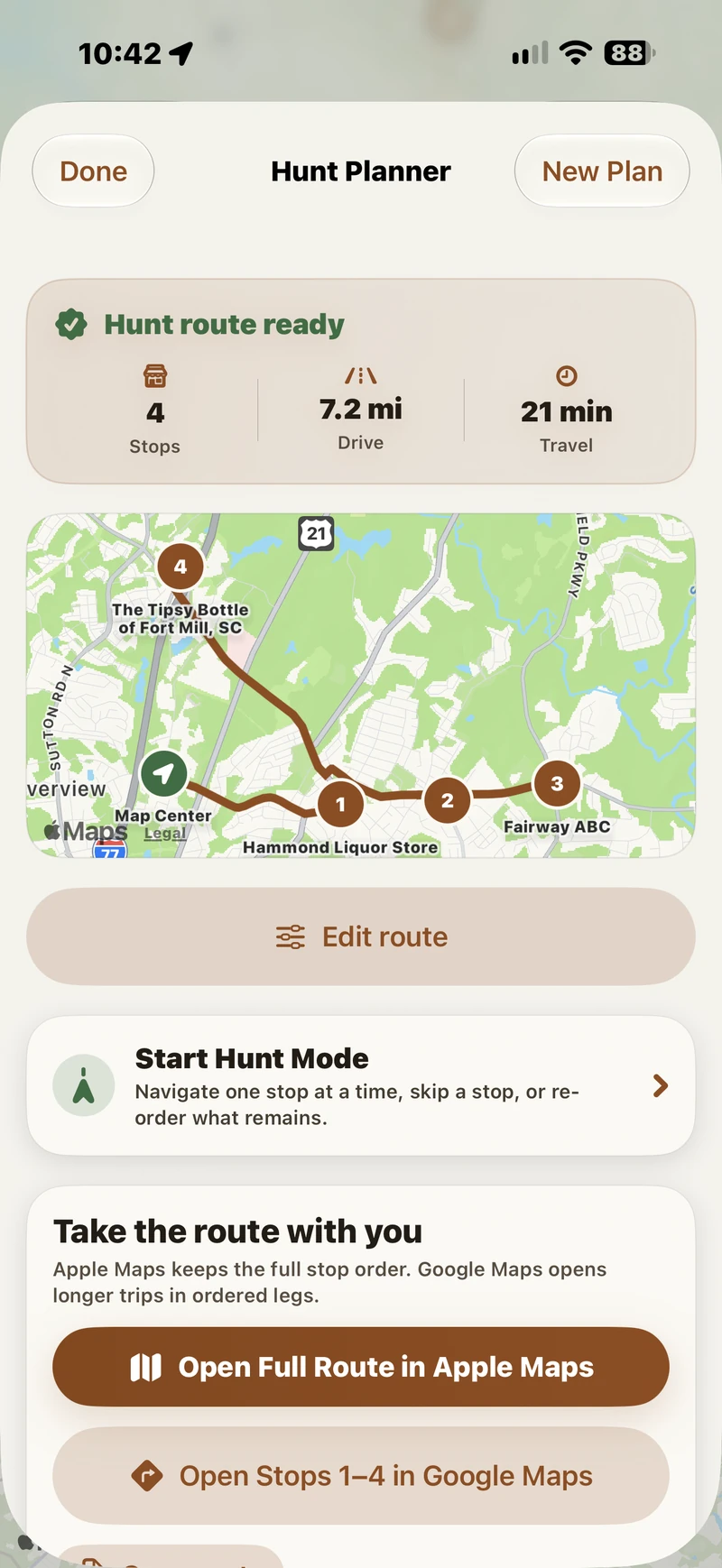
Stave connects the moment someone plans a hunt with information they can check before making a trip. The Hunt Planner screen shows how a chosen store can become part of a route.
A Store On The Map
A shopper can search nearby places, compare bourbon-focused Stave Scores, keep private notes, and add a store to a Hunt Planner route. An unrated store is simply unrated.
Your Published Details
Once verified and approved for publishing, your team can maintain store information and selected inventory. Shoppers see the source and update time; they should confirm important details with you.
Updates They Choose
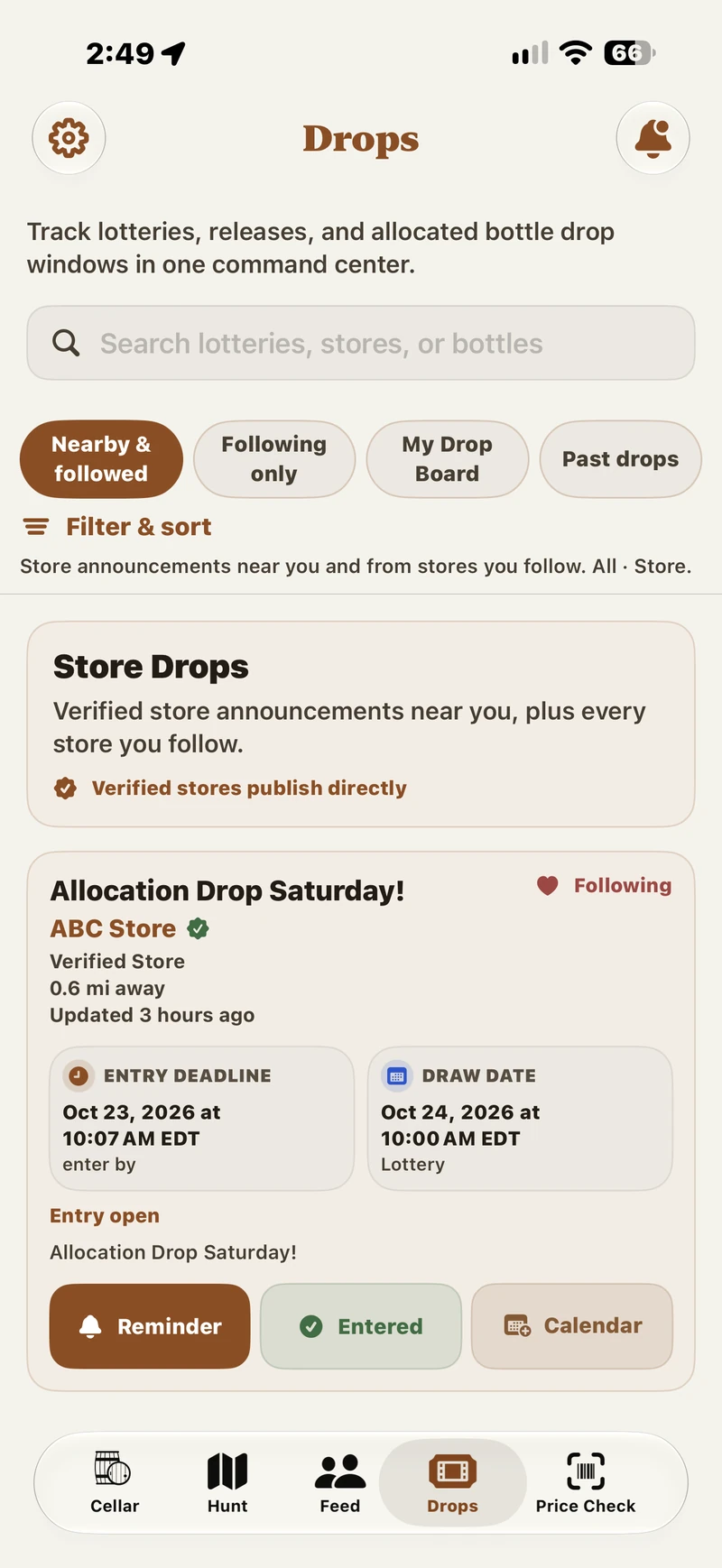
Shoppers can follow participating stores and explore local announcements and Drops. Eligible alerts depend on published content, location, participation, and each person's settings.
Your Store Presence
Choose What Your Team Shares.
Verified owners and approved staff manage a store through the existing Store Owner Portal. Start with information you can keep accurate, then add time-sensitive updates if they fit your routine.
Store Details
Review location, hours, contact information, and official links so shoppers have a useful starting point.
Selected Inventory
Publish exact catalog bottles with a price, availability, and an optional quantity. A product link to your own site is available only where approved for your location.
Expected Deliveries
Share a date, window, or recurring schedule for shipments to your store. An expected delivery does not mean a specific bottle is on the shelf.
Announcements And Drops
Tell shoppers about store updates. Event and permitted no-fee allocation notices need separate location approval and accurate rules; Stave does not administer entries or drawings.
A Presence You Can Maintain
Start With The Essentials. Keep The Details Honest.
There is no need to publish your entire shelf. An accurate profile and occasional useful announcement can be a practical starting point. If you publish inventory, a member of your team needs to keep it current.
Each stock confirmation lasts 72 hours. After that, a listing remains visible as availability unknown, while the old quantity and product link are hidden until your team checks and confirms it again. Update sold-out or changed items promptly rather than waiting for the window to end.
Who Can Maintain ItOwners and managers maintain store information and manage inventory and events; editors can maintain inventory, deliveries, and events. Each person uses their own account. Stave reviews claims and staff access.
Beyond The One-Time Visit
Give People A Reason To Check Back.
Use announcements for what you want customers to know: a store pick, a local product, an expected delivery, or an approved event. Drops can be discovered locally even by shoppers who have not followed you yet.
Published notices do not guarantee stock, entry, or an alert to every shopper. Keep timing and eligibility accurate, and update cancellations promptly.
Getting Started
A Clear Path To Your Store Page.
Store access is reviewed before an owner or staff member can publish on behalf of a location. We can help you identify a useful first update and review terms and service details during onboarding.
- 01
Contact Stave
Tell us which location you represent and what you would want shoppers to know. Ask for a walkthrough or a correction to an existing listing.
- 02
Claim And Verify
Sign in with your own Stave account and submit the store claim. Stave reviews owner authority and location access before publishing controls are approved.
- 03
Choose Your First Update
Review the store details, decide who will maintain the account, and publish only information your team can keep accurate. Some links and notice types require location approval.
- 04
Keep It Current
Check inventory before confirming it, update changes promptly, and revisit schedules, hours, and official links as they change.
Clear Responsibilities
What Stave Does. What Your Store Does.
Stave
- Provides store discovery, shopper-facing context, and the approved retailer publishing tools.
- Reviews store claims, roles, and location-specific publishing permissions.
- Shows published information with freshness cues and maintains independent community feedback.
Your Store
- Chooses what to publish and keeps store details, prices, stock, links, and notices accurate.
- Handles all purchase eligibility, alcohol sales, payment, taxes, and fulfillment on its own channels.
- Checks staff access and follows applicable rules for any event or allocation notice.
Stave does not sell alcohol, reserve bottles, take orders, collect drawing entries, or guarantee visits or sales.
Store Owner Questions
Good To Know.
Answers to the practical questions owners ask before getting started.
We Have Few Allocated Bottles. Is Stave Still Useful?
Yes. Shoppers may value your everyday bourbon selection, local products, store picks, knowledgeable staff, and clear store information. Your presence can focus on what actually makes your store useful.
We Already Use Social Media. Why Add Stave?
Keep using it. Stave reaches a different moment: when someone is looking for stores, planning a route, or browsing local bourbon updates. It gives a shopper a way to discover your store before knowing to search for your social account.
How Much Time Does It Take To Maintain?
Start with accurate store details and updates you can manage. Inventory is optional, but published items need prompt corrections when stock or price changes and a fresh confirmation after 72 hours. Check deliveries and official links as they change.
Can A Manager Or Staff Member Help?
Yes, after Stave reviews access. Owners and managers can maintain store information, inventory, and events; editors can maintain inventory, deliveries, and events. Each person should use their own account. An ownership handoff also requires a new verified claim.
What If A Partner Or Owner Needs To Approve?
Bring the person who can authorize the store into the claim and onboarding conversation. We review authority before granting publishing access. Service details and written terms can be reviewed before any separate paid decision.
Will Competitors See Our Prices Or Stock?
Published information is customer-facing, so other people can see it too. You choose which bottles to list. A published inventory offer currently requires a price; Stave does not promise a hide-price setting. We can review your publishing choices during onboarding.
Can Stave Link To Our Website Or Run A Drawing?
An approved product link can send a shopper to the matching bottle page on your own site. Event and permitted no-fee allocation notices require separate location approval; your store supplies the rules and handles the event. Stave does not take orders, payments, or drawing entries.
Does Joining Improve Our Community Score?
No. Stave Scores reflect submitted shopper experience. Your team can improve the information shoppers see, but participation does not buy a higher rating. A store without ratings is unrated, not a bad store.
What Does Store Service Cost?
We review the current service scope and written terms with the authorized owner during onboarding. Claiming a store does not automatically enroll it in paid service. Stave does not promise a specific number of visits or sales.
From Your Team To A Shopper
Make A Useful Update Visible.
This illustrative example describes the current flow; it is not a live listing or a portal screenshot.
A Selected Bottle
After store approval, an authorized teammate matches the exact catalog bottle, enters its current price and availability, and confirms stock after checking it. A quantity is optional.
Context For A Visit
A published listing can show the bottle, price, availability, retailer source, and update time in Stave. After 72 hours without a fresh confirmation, availability becomes unknown and old quantity and product link are hidden.
A map listing alone does not mean Stave has verified the owner or the inventory. A store claim is reviewed before publishing access is granted. Community ratings remain independent of retailer participation.
Two Ways To Begin
Fit Stave To Your Routine.
Choose a manageable start. Neither approach requires a rare-bottle allocation or a separate online shop.
Start With Store Details And Updates
Verify the location, review hours and contact information, and share an accurate announcement when something worth a visit changes. Revisit dates and links as they change; you do not need to publish inventory to begin.
Maintain A Small Bottle Selection
Publish a few exact catalog matches with required prices, check stock before confirmation, and update changes promptly. Review the 72-hour freshness window. Add a permitted event or Drop only if your location has the required approval and your team can maintain its details.
What If Our Store Has No Website?
You can maintain store details and publish selected inventory without an ecommerce website. A product link is optional and requires separate approval for your location; it must point to the matching product on your own site. Stave does not take orders or payments.
Share With An Owner Or Partner
The Store Case, In Brief.
Send this page to the person who can authorize your location. Stave can help shoppers find and evaluate your store, while your team controls what current details it publishes.
- Store discovery, route planning, and local updates create useful ways to be found.
- Owner authority and staff access are reviewed before publishing.
- Your team keeps published prices, stock, hours, and notices accurate.
- Terms and service details are reviewed with the authorized owner during onboarding; no traffic or sales result is guaranteed.
Start The Conversation
Show Shoppers What Makes Your Store Worth The Stop.
Ask about access, review your existing listing, or discuss a useful first update with Stave. Email support@stavebourbon.com and include your store name, location, and the best contact for ownership review.